/how-to-analyze-your-refunds-and-returns/
By following the steps below, you will be able to do some in-depth analysis for why your products are being returned.
You will be able to see the reasons customers state vs. the real reasons vs. what Amazon thought when they inspected the return.
Utilizing this information may help you cull items from your inventory that are causing potential damage to your metrics.
You may also be able to use this information in a defense of your situation should you find your account or a specific product suspended.
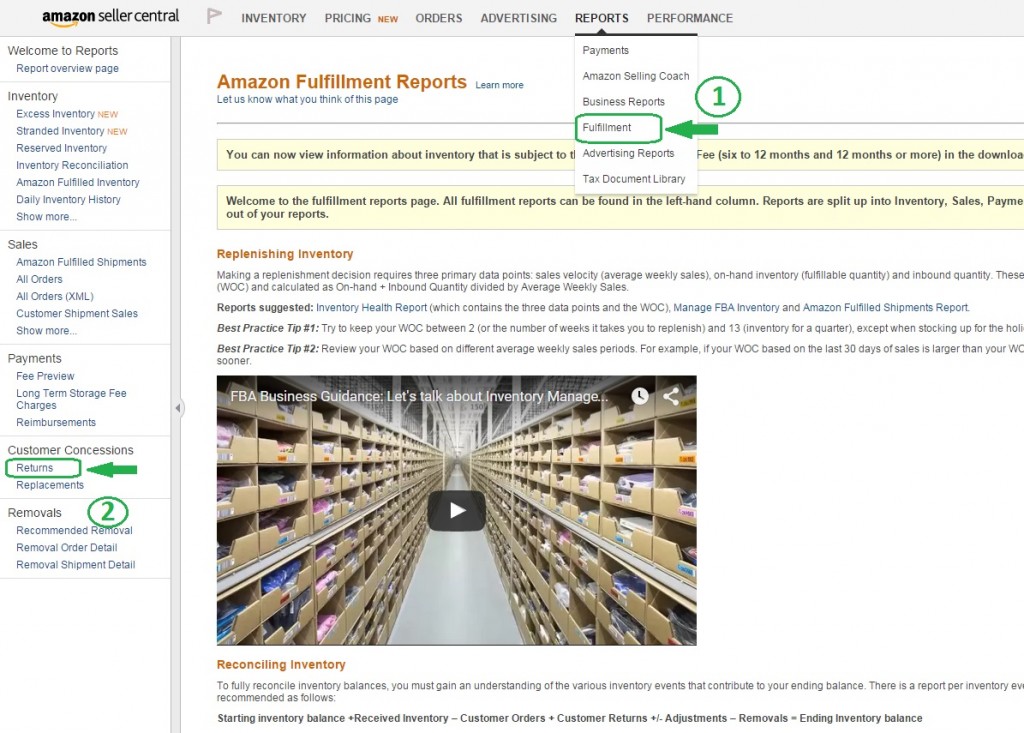
Click on Reports in the Top, Middle of the page and select Fulfillment Reports.
You may be able to go there directly by following this link if you are already signed in to your account: Fulfillment Reports.
Go to the Left side of the page, on the Bottom, under Customer Concessions, select Returns.
Choose the Download Tab, then the range you want such as the last 365 days and Request Download.
You can view that report on your screen instead by choosing View Online. If you choose the Download option, you will get a .txt file and you will need to import it into Excel so you can read it properly. Open Excel, then find (usually in your Downloads folder on your pc) and open the text file. You will have an Import Wizard pop up. Leave the radio button of Delimited checked. Hit the Next button. Leave the Tab box checked. Hit the Next button again. Then choose finish. You will want to save this as an Excel file where you can find it. Then, massage the information in the spreadsheet.
This information in the report is powerful because you can often see whether a buyer is gaming the system or not to get returns or free return shipping.
One way you can proactively prevent damage to your metrics is to always utilize inserts. They protect your account and prevent issues like especially buyer theft from causing an unnecessary and unmerited account suspension.
Here is an example: Item was marked as “Item is defective” under the Reason column.
Under the Status column–though not in the above example–you might see in some cases that same product is marked as “Unit returned to inventory.”
This is an obvious abuse of the system as you can see that Amazon didn’t see anything wrong with the product after they received it, inspected it, and put it back into inventory.
You can take steps NOW to avoid this some of this fraud by making sure you have a great insert that complies with the TOS.